Request a payment with a link
Create an order at the POS for a customer who isn’t there, and send them a secure link to pay.
Use a payment request when a customer orders by phone, WhatsApp or Instagram. Nothing is charged until they pay, and the stock is held at your branch.
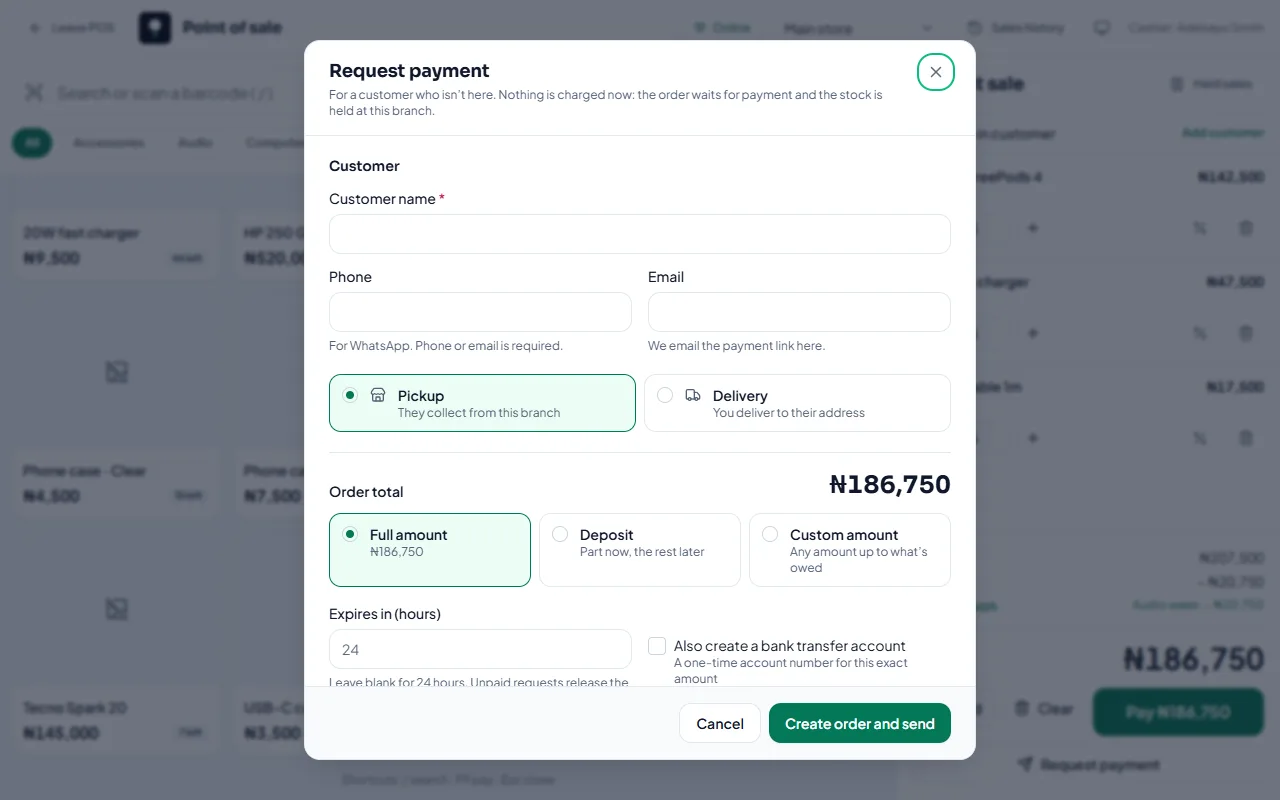
Send one
In the POS, add the items.
Select Request payment.
Enter the customer’s name and phone or email. (We email the link if you give an email.)
Choose how they’ll get it: Pickup from this branch, or Delivery to their address. Leave the Delivery fee blank if you’ll agree it later.
Under Ask for, choose Full amount, Deposit (part now, the rest later) or Custom amount.
Add a message to the customer if you like.
Select Create order and send.
Share it
Select Send on WhatsApp, Copy link, Copy message or Share.
To let them pay by bank transfer, select Create transfer account. They get a one-time account number for this exact amount, and the payment is confirmed automatically when it arrives.
How long it stays open
The request expires after 24 hours unless you change it (up to 7 days). Unpaid requests release the stock when they expire. Change the default in checkout settings.
Related articles
- Track payment requests, deposits and balances See what’s waiting, part paid or paid, ask for the balance, and resolve overpayments.
- Payment receipts for remote payments Each payment on a remote order gets a receipt you can view or print.
- Billing history and invoices Every plan payment, with its invoice number, date, amount and status.
- Failed payments and refunds What happens when an online payment fails, and how refunds reach customers.