Track payment requests, deposits and balances
See what’s waiting, part paid or paid, ask for the balance, and resolve overpayments.
Go to Payment requests. At the top you see what’s Waiting for payment, Still owed, Paid requests and Overpayments to resolve. Filter by staff or date.
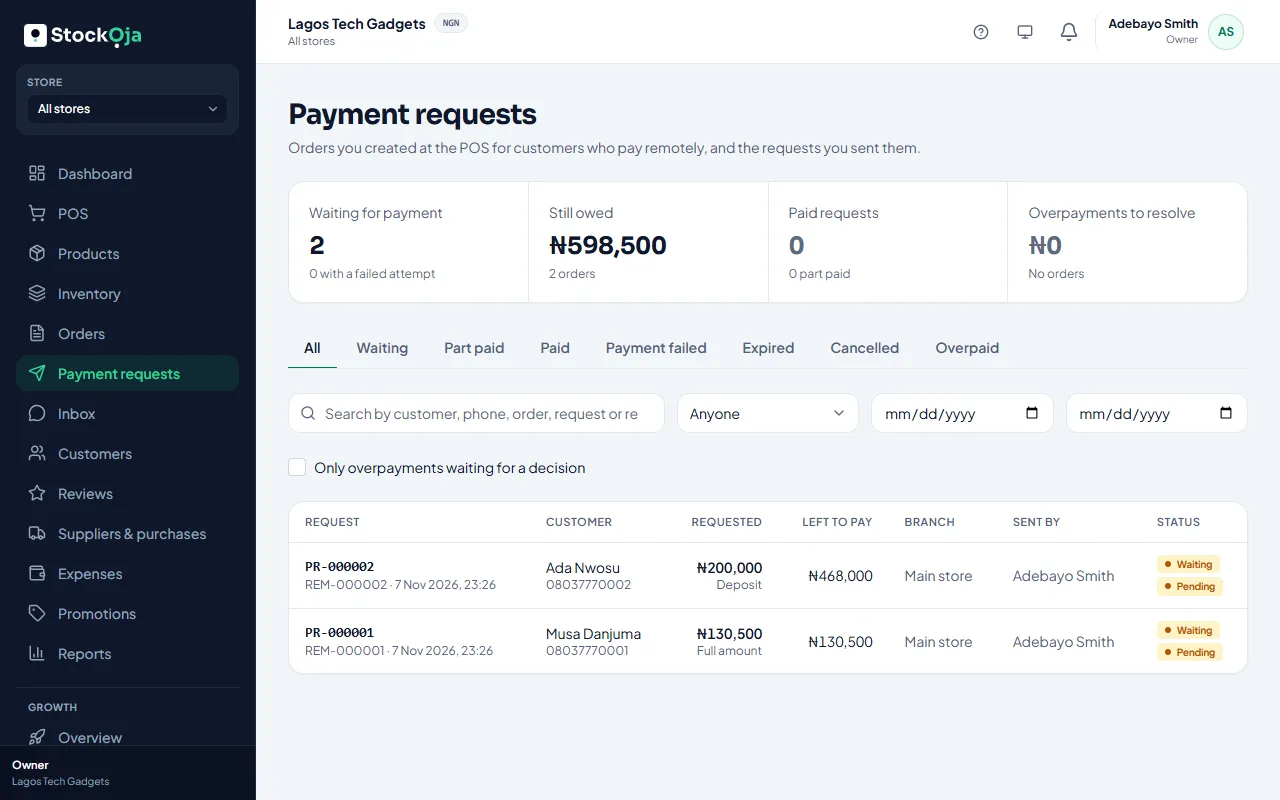
Request statuses
Waiting, Part paid, Paid, Expired, Cancelled and Payment failed.
Ask for the balance
On the order, select New request and choose Balance. A request still waiting is cancelled and replaced.
If the customer pays the balance in person, record it on the order when they collect.
Change the delivery fee
On a delivery order, select Set delivery fee (or Change delivery fee). The total and balance are recalculated, the customer is emailed the new total, and any waiting request is replaced.
Resend or cancel
Open a request to Share it again, Resend email or Cancel request.
Overpayments
If a customer paid more than the total, select Resolve overpayment: Refund the extra (sent back through Paystack) or Keep it, for example as agreed credit.
Related articles
- Request a payment with a link Create an order at the POS for a customer who isn’t there, and send them a secure link to pay.
- Payment receipts for remote payments Each payment on a remote order gets a receipt you can view or print.
- Failed payments and refunds What happens when an online payment fails, and how refunds reach customers.
- Get paid into your bank account Add the bank account Paystack pays your online sales into.