Sales and profit report
Net sales, gross profit, expenses and net profit, by payment method, channel and store.
Go to Reports → Sales & profit and choose a Period: the last 7, 30 or 90 days, this month, last month, this year or custom dates.
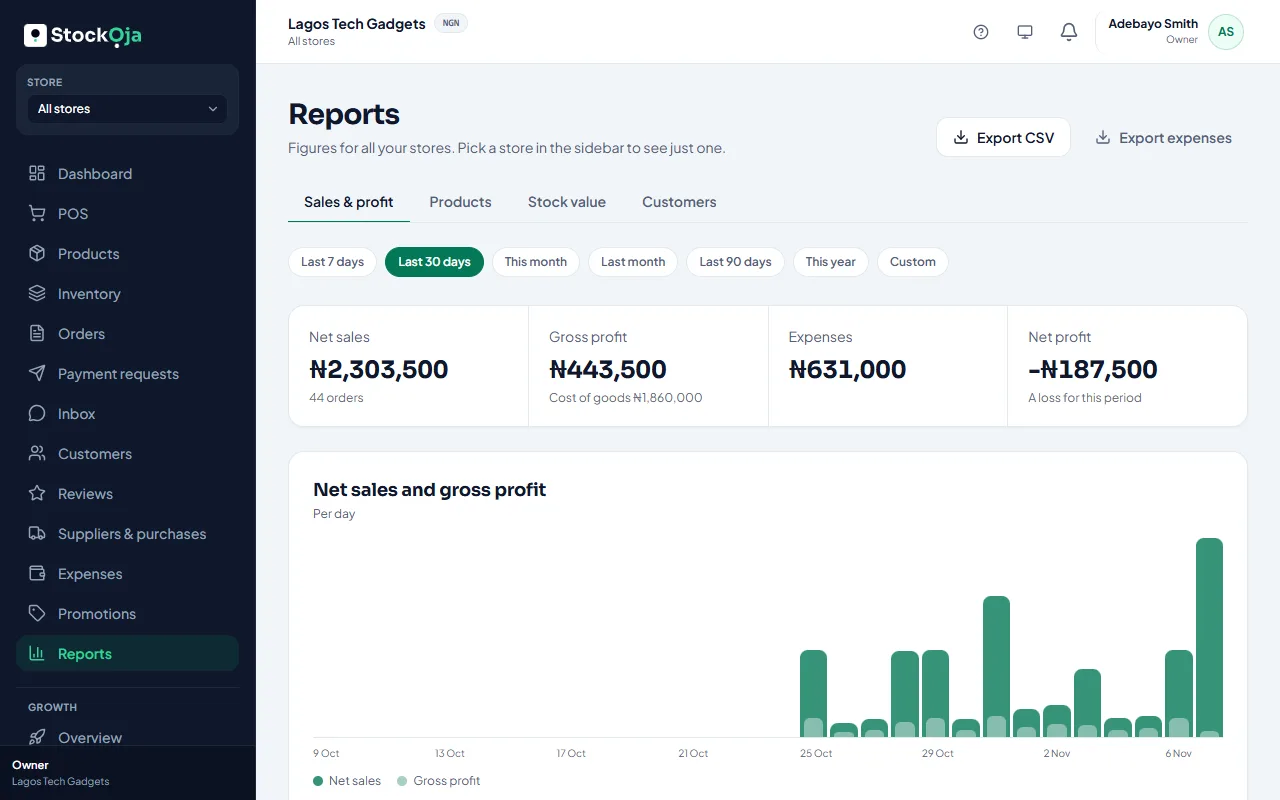
The numbers
Net sales, with the number of orders.
Gross profit: sales minus the Cost of goods.
Expenses recorded in the period.
Net profit: an estimate, gross profit minus expenses. A loss is marked.
The chart shows net sales and gross profit per day, week or month.
Summary
Sales before discounts, Discounts, Refunds, Tax collected, Revenue without tax, Units sold and the Average sale.
Breakdowns
By payment method: cash, card, transfer, other and Paystack (online).
In store vs online.
By store.
Related articles
- Which products sell best Units, sales, cost, profit and margin for each product.
- Export reports to CSV Download a report or your expenses as a CSV file for Excel or your accountant.
- Record an expense Record rent, transport, salaries and other running costs by store and category.
- Won deals and paid sales Link orders to deals so StockỌja shows what was actually paid, not just agreed.