Hand over a pickup order
Check the customer’s 6-digit pickup code, collect any payment due and complete the pickup.
When an order is Ready for pickup, the customer comes in with their pickup code from their email or order page.
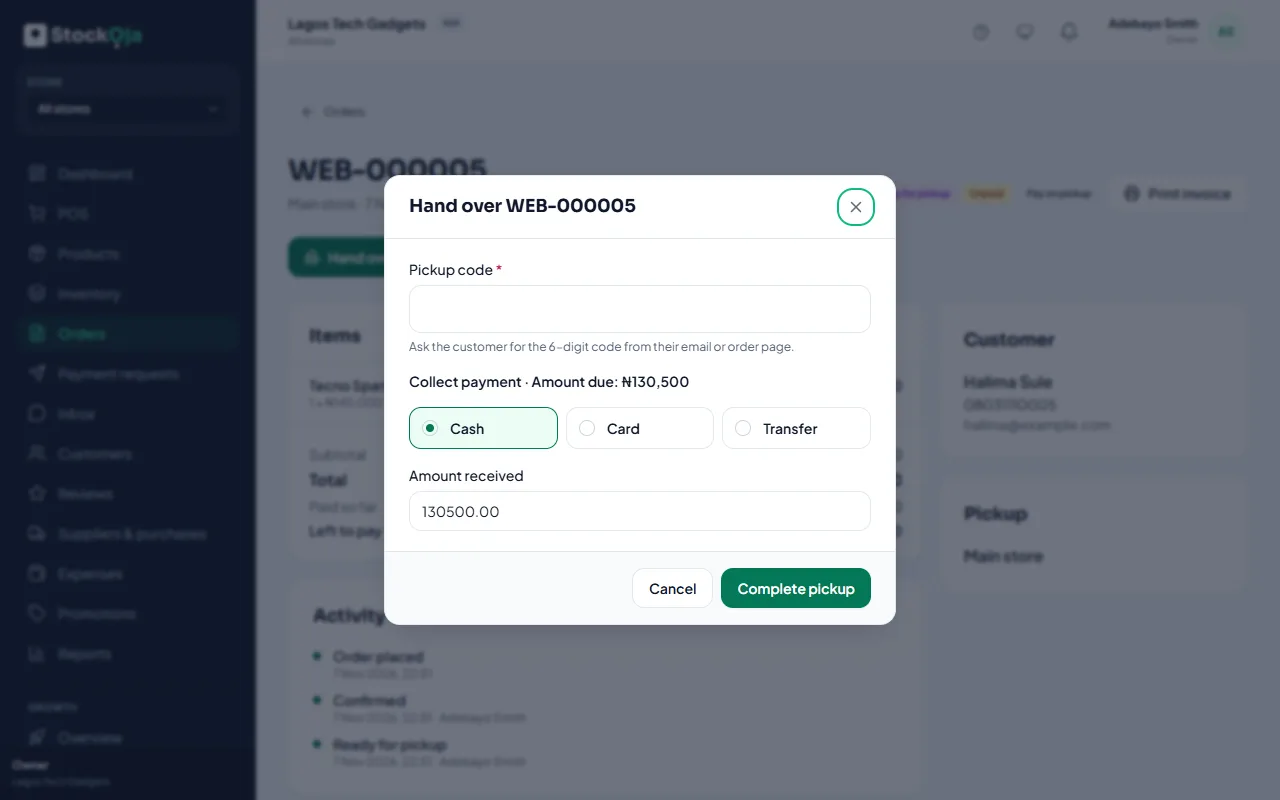
Open the order and select Hand over order.
Ask for the 6-digit Pickup code and type it.
If they chose Pay on pickup, collect the Amount due and record how they paid.
Select Complete pickup.
The order is completed and the stock leaves your store.
Which branches offer pickup
Turn on Offer pickup from this store for each branch in Stores.
Related articles
- Handle online orders Confirm new orders, get them ready, then hand them over or deliver them.
- Add and manage stores (branches) Each branch has its own stock, sales, staff and expenses.
- Delivery options: pickup, your own delivery, or delivery areas Choose how customers get their online orders. You can change it any time.
- How customers order, track orders and use accounts What shoppers see: checkout, the pickup code, order tracking and optional accounts.