Handle online orders
Confirm new orders, get them ready, then hand them over or deliver them.
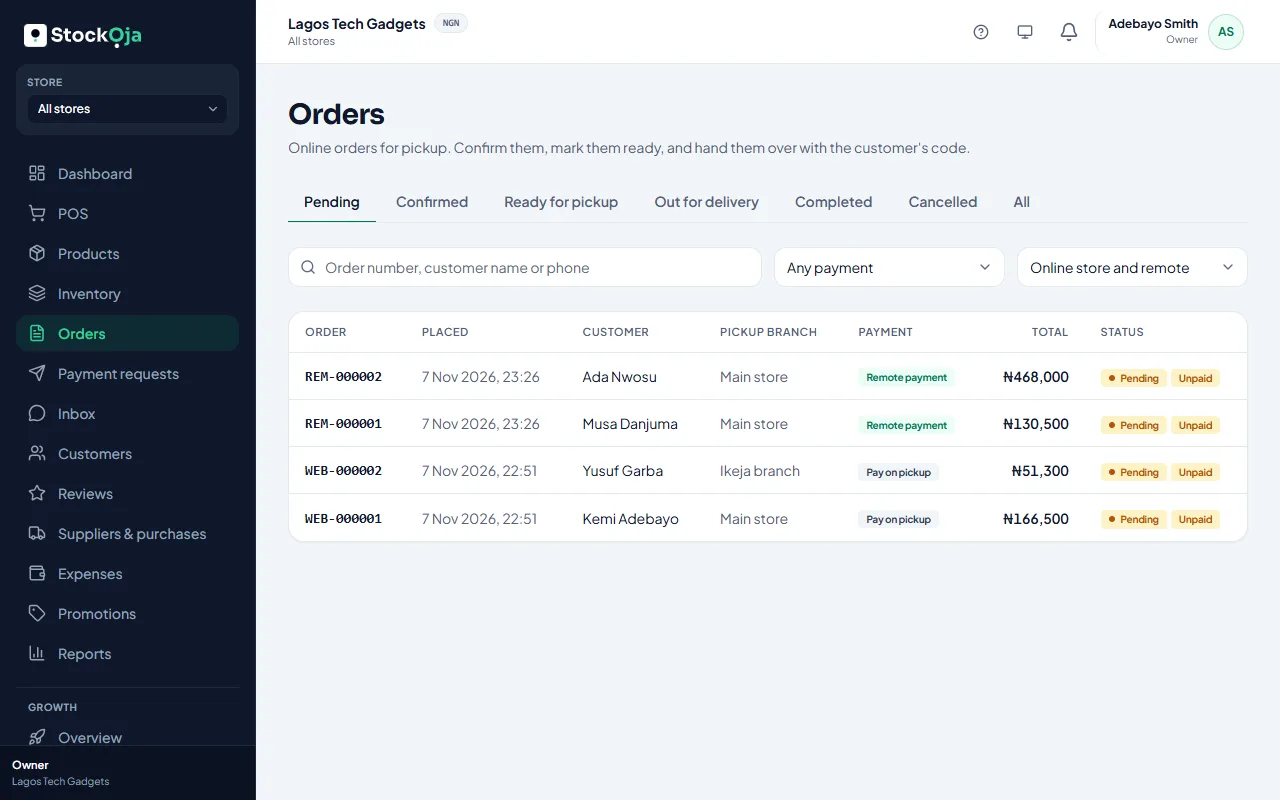
Orders from your online store, and remote orders paid by payment request, are in Orders. New orders also show on your dashboard under Needs your attention, and you get a notification.
Pickup orders
Open the order and select Confirm order.
When it’s packed, select Mark ready for pickup. The customer is told.
When they arrive, select Hand over order and enter their pickup code. See Hand over a pickup order.
Delivery orders
Confirm the order.
When it leaves, select Out for delivery. The customer is told.
When it arrives, select Mark delivered. See Deliver an order.
Use the filters to see orders by status or payment, and Orders from to separate online store and remote orders. Select Print invoice for a paper copy.
Related articles
- What each order status means Pending, confirmed, ready, out for delivery, completed and cancelled, plus payment statuses.
- Hand over a pickup order Check the customer’s 6-digit pickup code, collect any payment due and complete the pickup.
- Deliver an order Mark a delivery order out for delivery, then delivered.
- Accept delivery addresses (fee agreed later) Let customers choose delivery and type their address, then agree the fee with them.