Delivery options: pickup, your own delivery, or delivery areas
Choose how customers get their online orders. You can change it any time.
Go to Settings → Payments & tax → Delivery and answer How will you deliver orders?
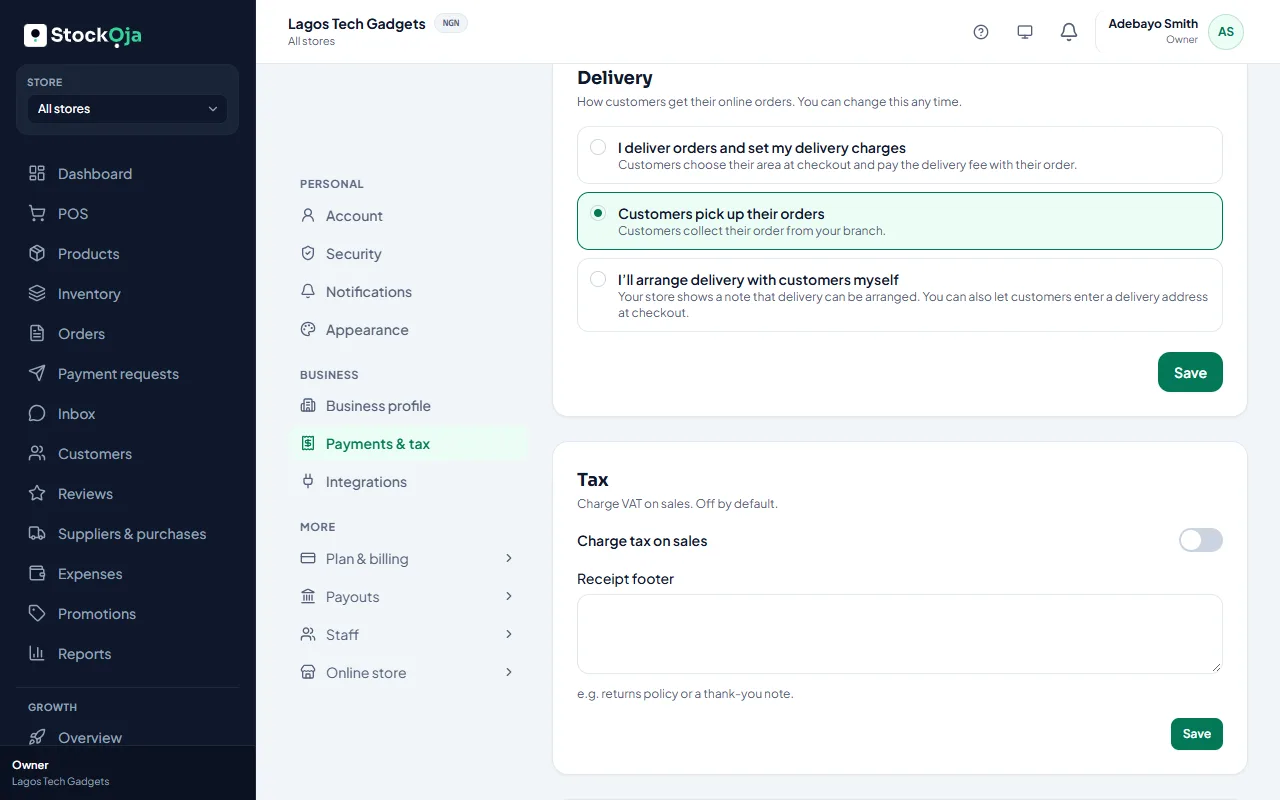
Customers pick up their orders
Customers collect from your branch. This is the default. Pickup is free for customers.
I’ll arrange delivery with customers myself
Your store shows a note, such as “We deliver within Lagos; we’ll call you to arrange it”. You can also turn on Accept delivery addresses at checkout.
I deliver orders and set my delivery charges
You list the areas you deliver to, each with a fee. Customers choose their area at checkout and pay the fee with their order. See Set up delivery areas and fees.
Customers can always choose pickup from branches that offer it.
Related articles
- Set up delivery areas and fees Add each area you deliver to with its fee, and choose the branch deliveries go from.
- Accept delivery addresses (fee agreed later) Let customers choose delivery and type their address, then agree the fee with them.
- Hand over a pickup order Check the customer’s 6-digit pickup code, collect any payment due and complete the pickup.
- Deliver an order Mark a delivery order out for delivery, then delivered.