Choose and customise a theme
Pick a design, then set your colours, banner, home page, contact details and policies.
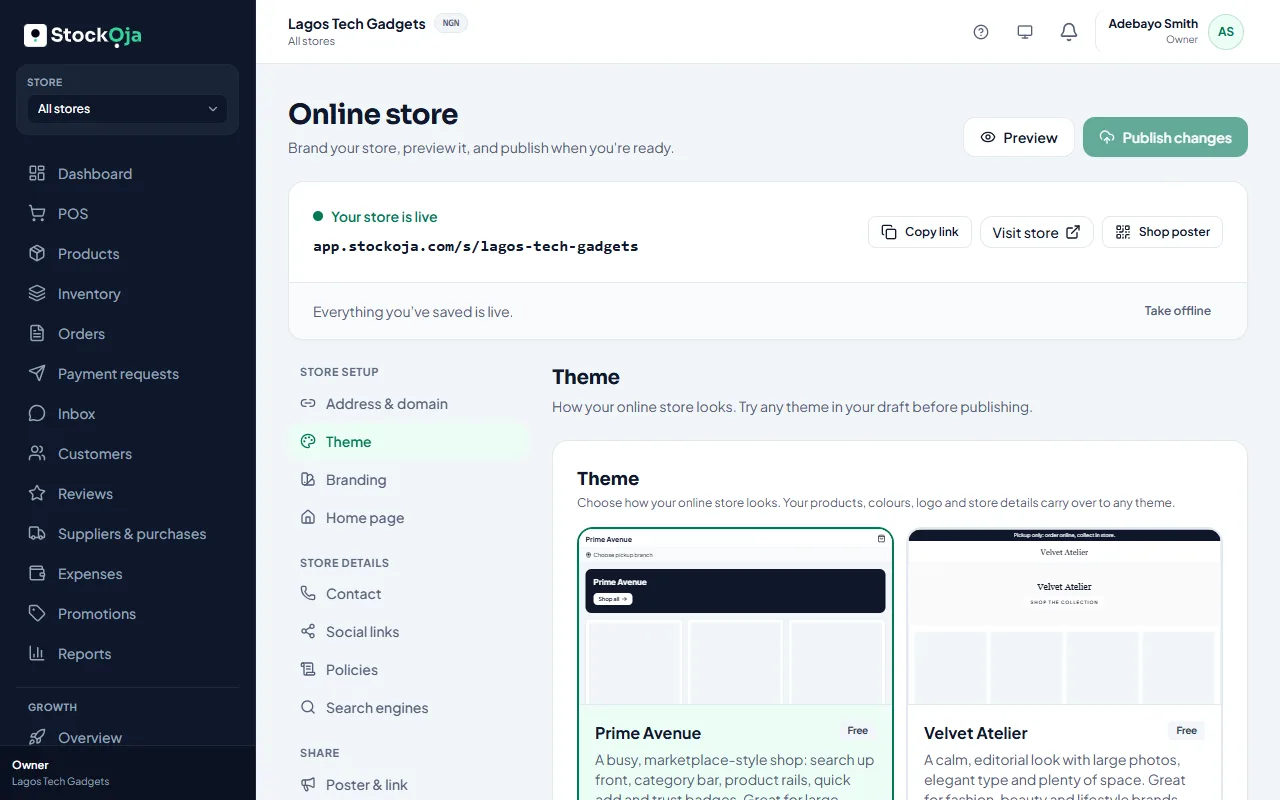
Choose a theme
In Online store → Theme, pick a design:
Prime Avenue: a busy, marketplace-style shop with search up front. Great for large catalogues.
Golden Basket: bright and fast, with departments and quick add-to-cart. Great for groceries and supermarkets.
Velvet Atelier: calm and editorial, with large photos. Great for fashion, beauty and lifestyle.
Blossom Aura: soft and luxurious. Made for perfume, body care and beauty.
Select Use this theme. It changes your draft only; select Publish changes to show it. Your products, colours, logo and details carry over to any theme.
Each theme has its own settings, such as products per row or an announcement bar.
Make it yours
Branding: main and accent colours, and a wide banner image (about 3:1). Your logo comes from Settings → Business profile.
Home page: a headline and About your store.
Contact: phone, email, WhatsApp and address.
Social links: Instagram, Facebook, X and TikTok.
Policies: your returns and pickup rules.
Related articles
- Set up and publish your online store Choose your address, add a bank account, put products online and publish.
- Edit your business profile and logo Your business details and logo show on receipts and your online store.
- Light and dark mode Choose Light, Dark or Match my device.
- Connect your own domain Use your own address, such as www.yourbusiness.com, for your online store.