Check your stock levels
See what’s on hand, reserved for online orders and free to sell in each store.
Go to Inventory → Stock levels.
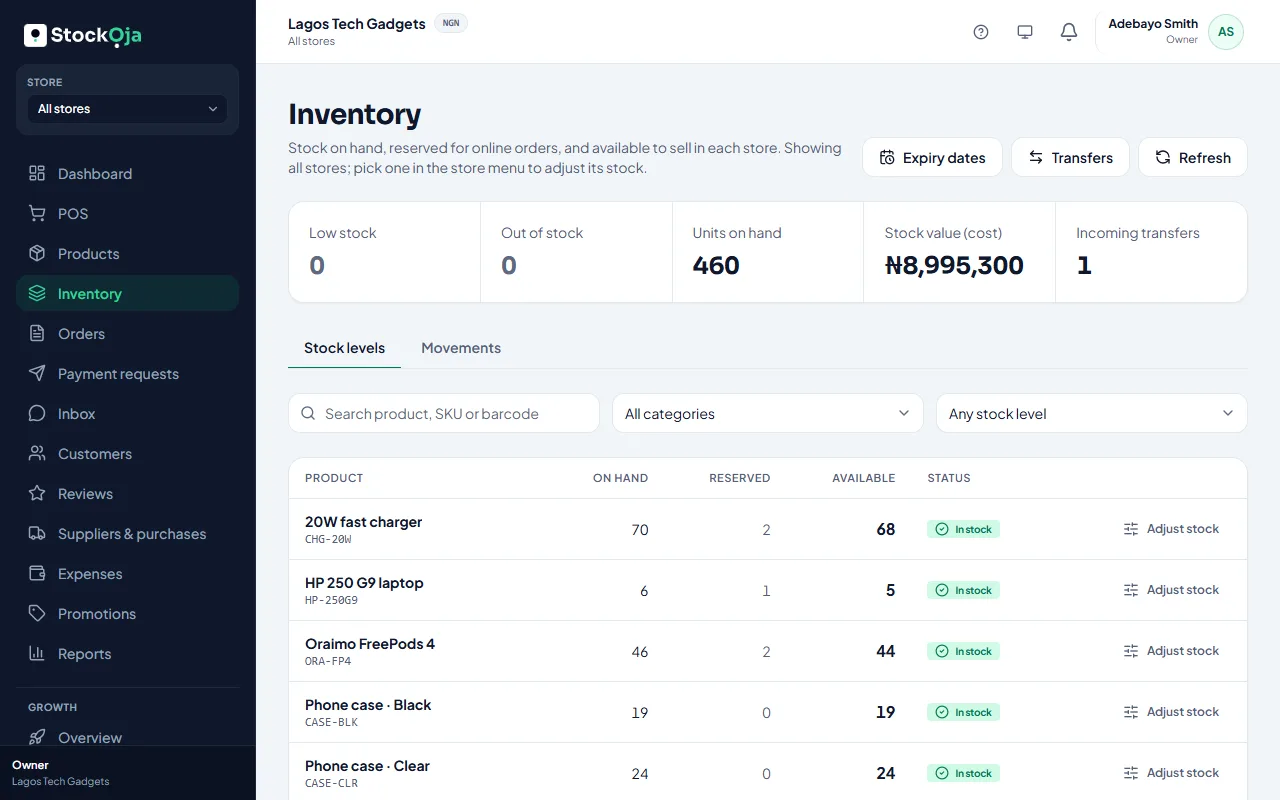
What the numbers mean
On hand: what’s physically in the store.
Reserved: held for online orders and payment requests that aren’t finished yet.
Available: on hand minus reserved. This is what you can still sell.
At the top you see how many products are Low stock or Out of stock, your Units on hand, your Stock value (cost) and any Incoming transfers. Select a box to see just those products.
One store or all
With All stores chosen in the store menu, you see totals. Pick a store to see and adjust its stock.
Find what to reorder
Filter by Low stock or Out of stock. Select a product to see its stock in each store and its movement history.
Related articles
- Adjust stock (and why a reason is required) Add, remove or set a counted quantity, with a reason that’s kept in the history.
- Stock history for a product Every stock change, with who made it, when and why.
- Low-stock alerts Get warned before you run out, per product and per store.
- Count your stock and correct differences Do a stock count and record the real numbers with adjustments.