Send a campaign
Write an email or WhatsApp offer for a segment, get it approved, then see delivery and the orders it brought.
Write the campaign
Go to Growth → Campaigns and select New campaign.
Give it a Campaign name (only your team sees it) and a Goal, such as Promotion or Back in stock.
Choose the Channel:
Email comes from your store’s name through StockỌja. Replies go to your business email.
WhatsApp comes from your own WhatsApp number, as a message WhatsApp reviews first. WhatsApp charges you per message.
Under Audience, choose A segment, or Pick customers by hand.
Add up to 6 Featured products.
Write the Subject (email) and Message. Write {first_name} where the person’s first name should go. The Preview shows what people see.
Save draft.
Get it approved
Check Before you submit: how many people can receive it, and any problems, such as an out-of-stock product.
Select Submit for approval.
Someone with approval rights opens it, then selects Approve to Send now or Schedule it. Or they select Send back and say What needs to change.
A WhatsApp campaign also waits for WhatsApp to approve the message. That usually takes minutes.
Results
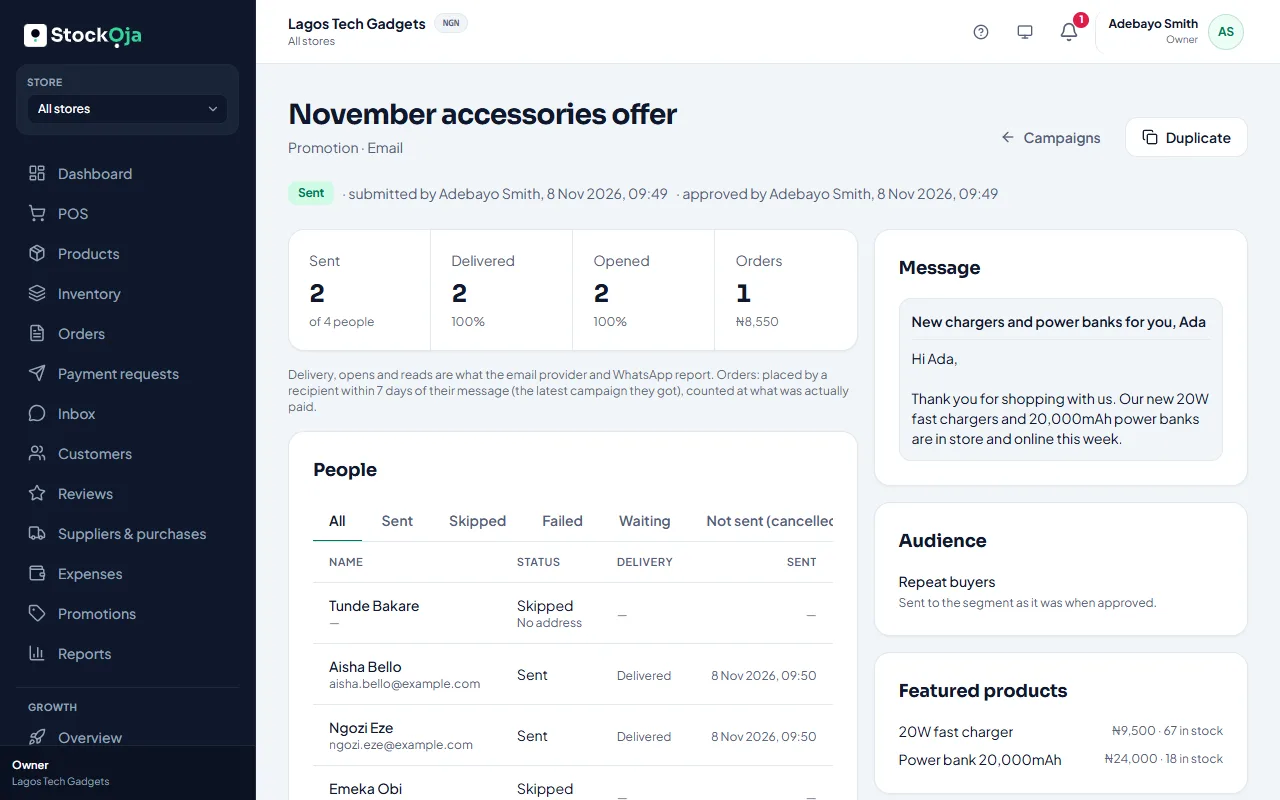
The campaign shows Sent, Delivered, Opened (email) or Read (WhatsApp), and Orders. Under People, you can see each person and why anyone was skipped, such as no consent.
Orders are orders a recipient placed within 7 days of the message, in store or online. The amounts are what was actually paid.
Related articles
- Build a segment Choose who a campaign goes to with filters, such as customers who bought a product or haven’t bought in a while.
- Record who agreed to hear from you Campaigns and automatic messages only go to people with marketing consent. Record it per channel, with a note.
- Automatic messages (workflows) Switch on ready-made messages: a cart reminder, a welcome, win back, buy again and back in stock for leads.
- Create a coupon or automatic discount Run a coupon code for a campaign, or an automatic discount such as 10% off drinks.