Build a segment
Choose who a campaign goes to with filters, such as customers who bought a product or haven’t bought in a while.
A segment is a saved group of customers or leads. It updates by itself as people buy or change.
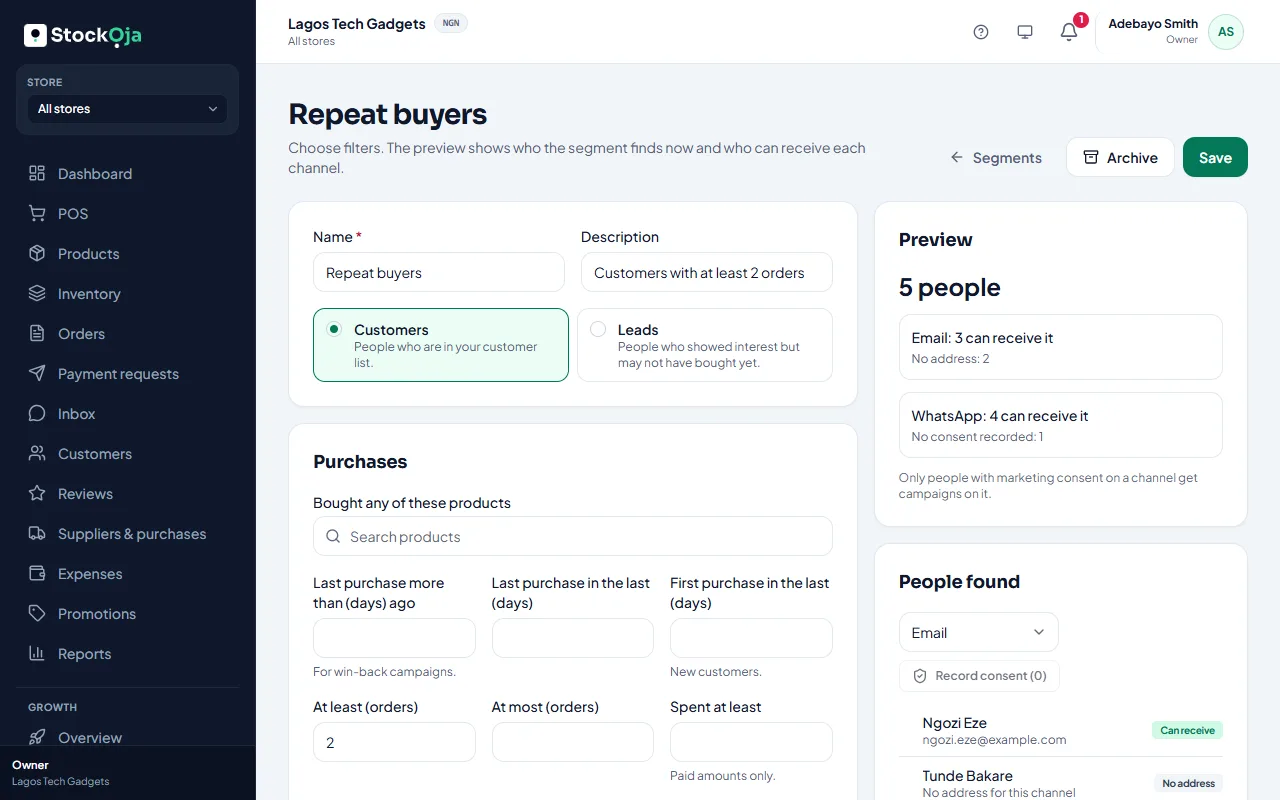
Make a segment
Go to Growth → Segments and select New segment.
Give it a Name, then choose Who: Customers or Leads.
Choose filters. For customers, for example:
Bought any of these products, and Bought them in the last (days);
Last purchase more than (days) ago, for win-back offers;
First purchase in the last (days), for new customers;
At least (orders) and Spent at least (paid amounts only);
Bought at branch, Has chatted with you on, and Leave out people messaged in the last (days).
Check the Preview: how many people it finds, and how many can receive it on each channel.
Save.
Archive a segment you no longer need. Campaigns already approved keep the people they were approved for.
Related articles
- Send a campaign Write an email or WhatsApp offer for a segment, get it approved, then see delivery and the orders it brought.
- Record who agreed to hear from you Campaigns and automatic messages only go to people with marketing consent. Record it per channel, with a note.
- What Growth does for your business Leads, a sales pipeline, follow-ups, campaigns and automatic messages, with paid amounts taken from real orders.
- Add and import leads Add a lead by hand, or import contacts from a CSV file. Duplicates are caught for you.