Record who agreed to hear from you
Campaigns and automatic messages only go to people with marketing consent. Record it per channel, with a note.
StockỌja only sends offers to people who agreed to hear from you, on the channel they agreed to: Email or WhatsApp. A purchase or a chat doesn’t count as agreeing.
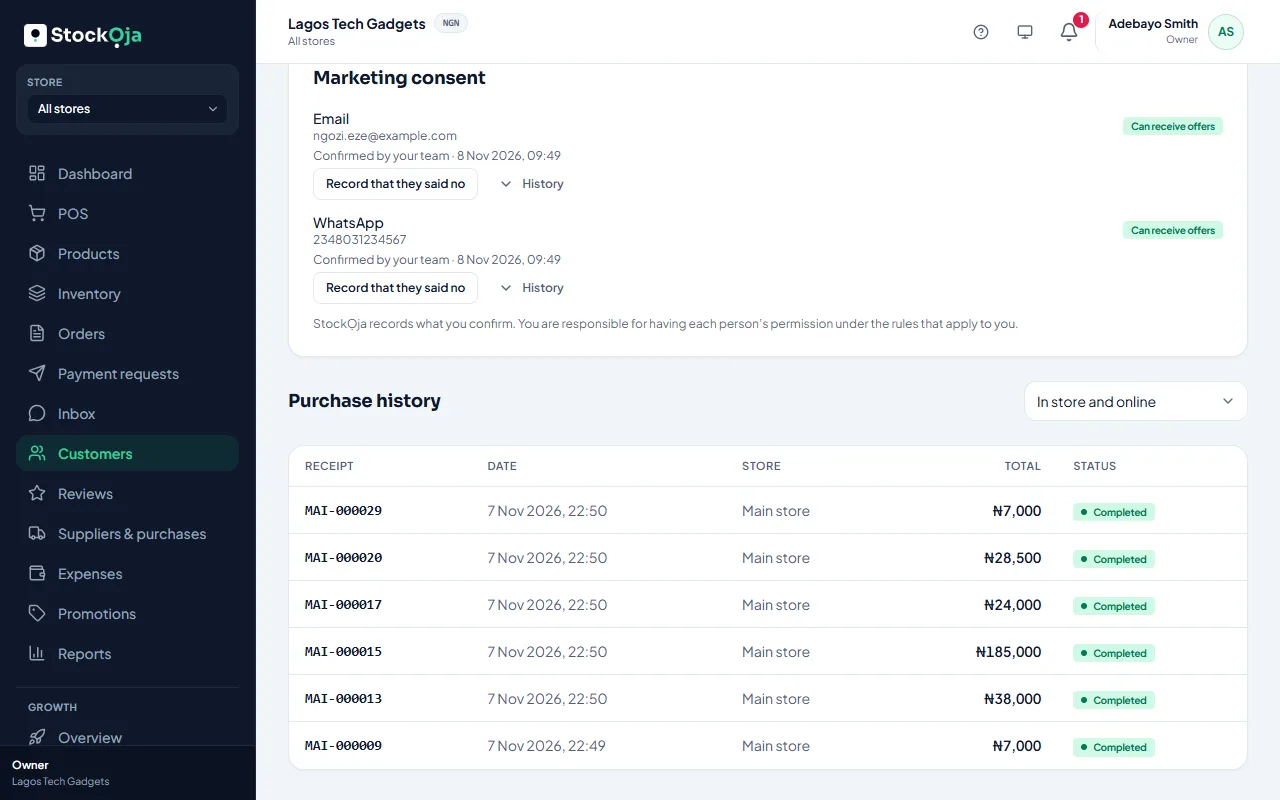
Record consent for one person
Open the customer (or the lead) and find Marketing consent.
On the channel they agreed to, select I have their permission.
Write a Note saying how and when they agreed, such as “Ticked the box on our sign-up form, 8 Nov”.
Tick This person agreed to get offers from us on this channel. and save.
Each channel shows Can receive offers, Said no or Not asked, and its History: who recorded what, and when.
If someone tells you they don’t want offers, select Record that they said no.
Record consent for many people
In a segment’s Preview, select Record consent to confirm it for the people shown, with one note. People who opted out themselves, and people without an address on that channel, are left out.
How people opt out themselves
Every email ends with an unsubscribe link.
On WhatsApp, they reply STOP.
Either way, StockỌja records it and stops sending. To send to them again, they must ask you, and your note must say how.
Related articles
- Build a segment Choose who a campaign goes to with filters, such as customers who bought a product or haven’t bought in a while.
- Send a campaign Write an email or WhatsApp offer for a segment, get it approved, then see delivery and the orders it brought.
- Add and manage customers Keep your customers’ contact details and notes in one list, shared by all stores.
- A feature is missing from my menu Menu items show only when your role allows them and your plan includes them.