Create a coupon or automatic discount
Run a coupon code for a campaign, or an automatic discount such as 10% off drinks.
Go to Promotions and select New promotion.
Choose the Type of promotion:
Coupon code: applies when the customer gives the code, such as EASTER10.
Automatic: applies by itself to every qualifying order.
Give it a Name. It’s shown on receipts, for example Easter sale.
Choose the Discount type: Percentage off or Fixed amount off, and the value. For a percentage, you can set a Maximum discount.
Set the rules: see Promotion rules.
Save.
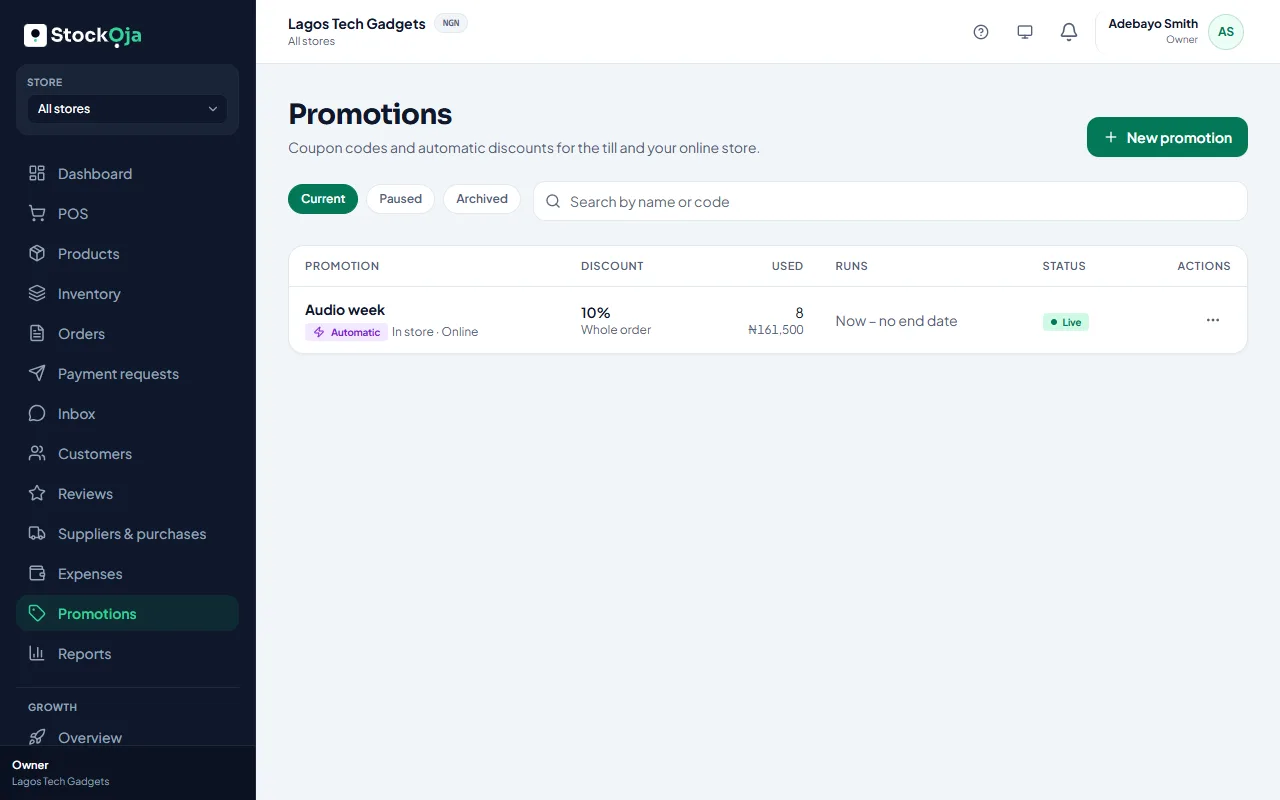
Manage promotions
The list shows each promotion as Live, Scheduled, Ended, Used up, Paused or Archived, with how often it’s been used.
Pause stops it for now; Resume starts it again.
Archive stops it for good. Past orders keep their discount.
Related articles
- Promotion rules: dates, limits and where they apply Control when a promotion runs, how often it can be used, and which products, stores and channels it covers.
- Give a discount or use a coupon Take an amount or percentage off one item or the whole sale, or apply a coupon code.
- Send a campaign Write an email or WhatsApp offer for a segment, get it approved, then see delivery and the orders it brought.
- Record an expense Record rent, transport, salaries and other running costs by store and category.