Saved carts and cart reminders
See shoppers who left your online store at checkout, and send them one reminder with a link back to their cart.
When a shopper types a phone number or email at checkout, their cart is saved. If they leave without ordering, you can see it, and the Cart reminder workflow can remind them once.
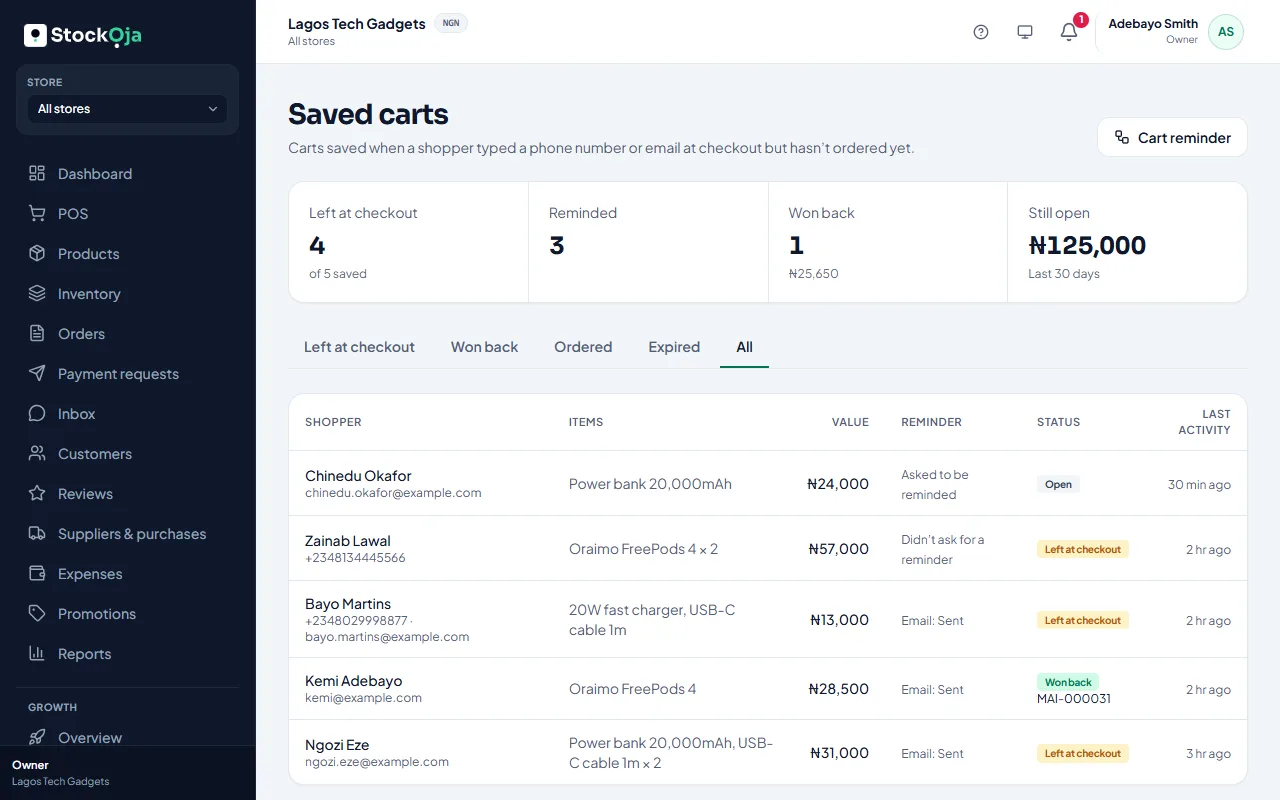
Saved carts
Growth → Saved carts shows:
Left at checkout: carts untouched for the reminder delay (one hour unless you change it);
Reminded: carts that got a reminder;
Won back: carts ordered after a reminder, with the amount paid;
Still open: the value of carts not yet ordered.
Use the tabs to see carts Won back, Ordered (without a reminder) and Expired (after a week with no activity).
Turn on cart reminders
Select Cart reminder (or go to Growth → Workflows and set up Cart reminder).
Choose how long after the cart is left to send it, from 30 minutes to 24 hours.
Save, submit it, and have it approved.
Once it’s on, your store’s checkout shows Remind me if I don’t finish. A shopper who ticks it, or who already agreed to hear from you, gets one reminder by WhatsApp or email. Its button opens their cart with today’s prices.
Related articles
- Automatic messages (workflows) Switch on ready-made messages: a cart reminder, a welcome, win back, buy again and back in stock for leads.
- How customers order, track orders and use accounts What shoppers see: checkout, the pickup code, order tracking and optional accounts.
- Sell at the counter with the POS Find or scan products, take payment and complete the sale. Stock goes down by itself.
- Online checkout and payment request settings Choose whether shoppers can pay cash on collection, and how long payment requests stay open.