Take a guided tour
Short tours show you around the app and walk you through common tasks, one step at a time.
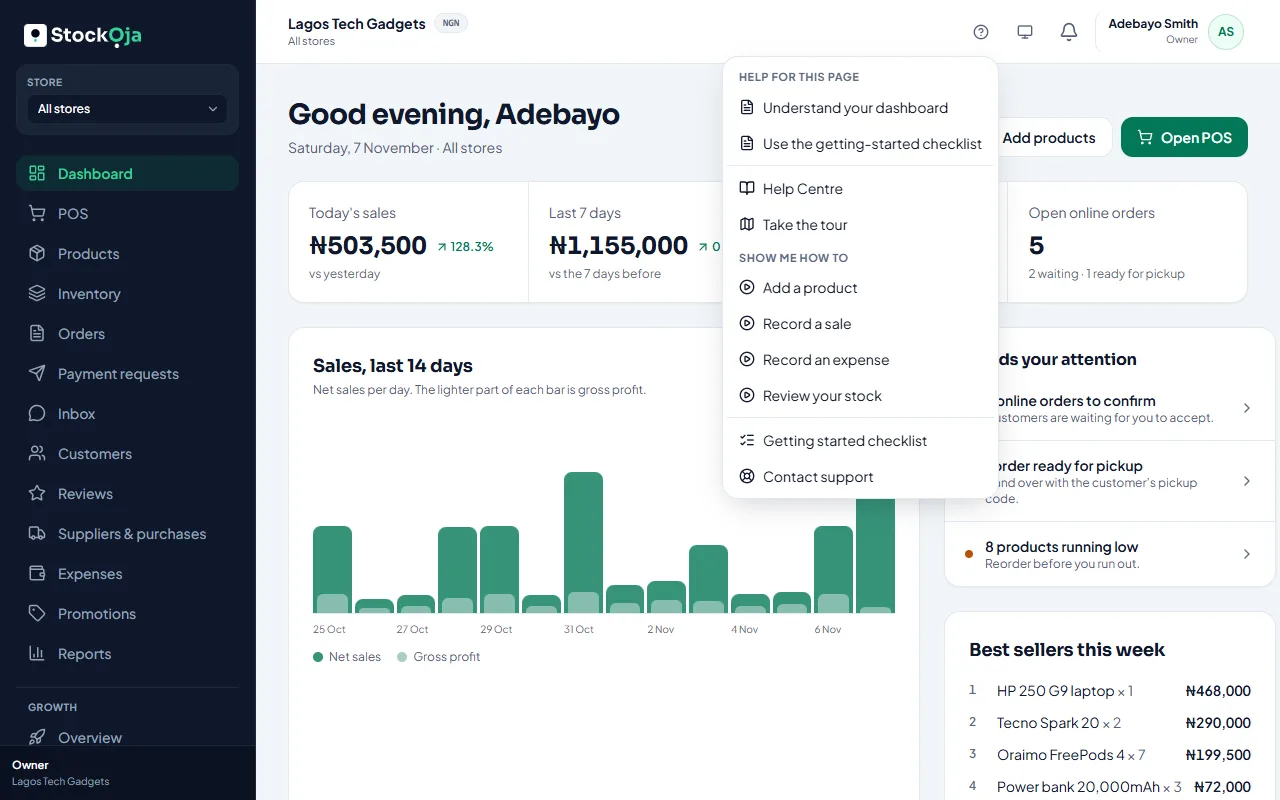
StockỌja has a short tour of the app and step-by-step walkthroughs for common tasks. You can start them any time from Help, the ? at the top of the app.
The tour
Take the tour shows where everything is: the menu on the left, Products, Inventory, the POS, Expenses, your online store and the checklist. It takes about a minute.
Walkthroughs
Under Show me how to, pick a task:
Add a product
Record a sale
Record an expense
Review your stock
The guide highlights each button. Some steps wait for you to do them; the guide moves on once that step is saved. Finished walkthroughs show a tick.
Select Close the guide at any time. Nothing you’ve done is undone.
Related articles
- Find your way around the app The menu, the store switcher, notifications, Help and your account menu.
- Use the getting-started checklist The checklist on your dashboard shows the first things to do. Tick them off in any order.
- Create your account (email or Google) Sign up with your email and a password, or with your Google account. It’s free to start.
- Make your first sale in 5 minutes Add a product, then sell it at the POS. Stock goes down by itself.