Work a lead from new to customer
Update the status, add notes, merge duplicates, then make them a customer or mark them lost.
Open a lead in Growth → Leads to see their details, products they’re interested in, deals, follow-ups, chats, orders and the Timeline of everything that has happened.
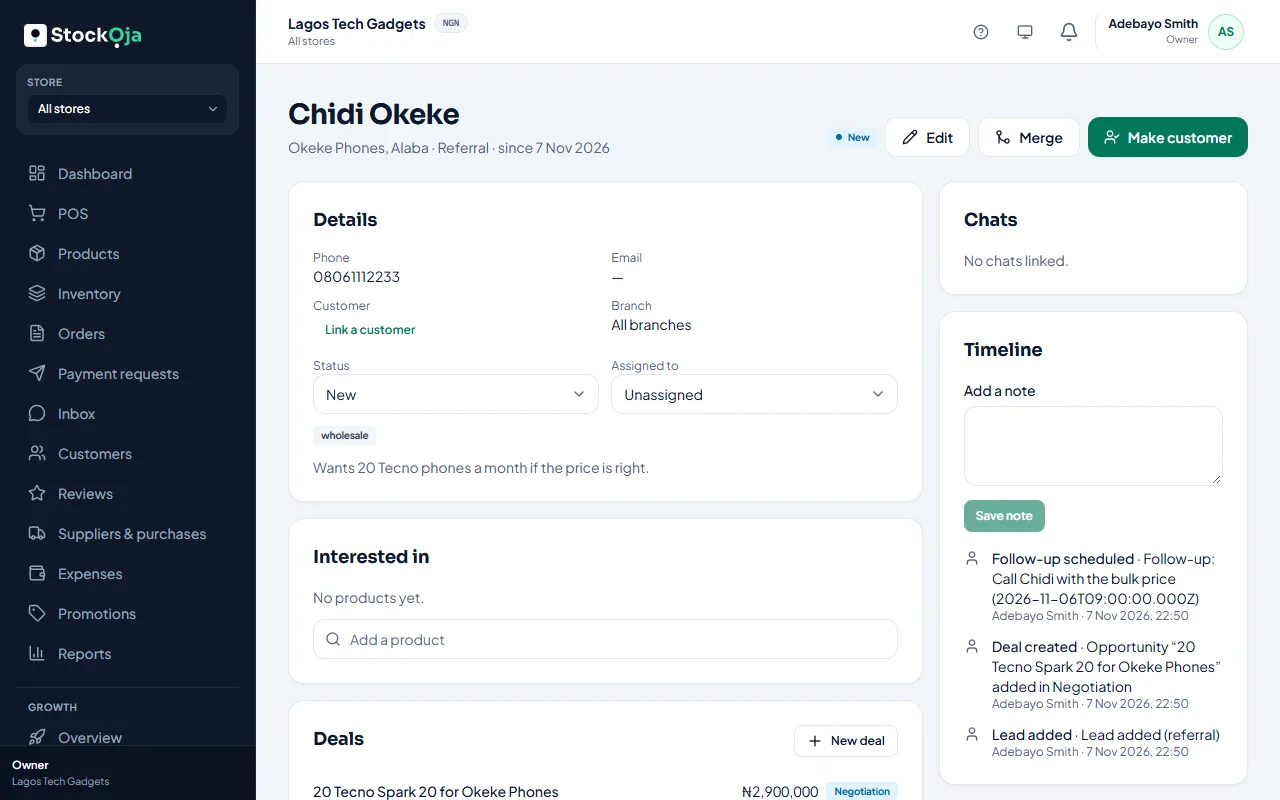
Statuses
Open: New, Contacted, Qualified.
Closed: Not a fit, Converted, Lost and Merged.
What you can do
Add a note to the timeline.
Assign the lead to a teammate.
New deal: when they’re ready to buy. See Manage your pipeline.
Schedule follow-up: a reminder for your team.
Make customer: links or creates the customer record and marks the lead Converted.
Mark as lost: give the reason. The lead stays in your records.
Merge: move another lead’s chats, products, deals and timeline into this one. The other lead is kept, marked as merged.
Related articles
- Add and import leads Add a lead by hand, or import contacts from a CSV file. Duplicates are caught for you.
- Manage your sales pipeline Create deals, move them through stages, and mark them won or lost.
- Follow-ups and reminders Schedule reminders to contact a lead or move a deal. StockỌja reminds your team, never the customer.
- What Growth does for your business Leads, a sales pipeline, follow-ups, campaigns and automatic messages, with paid amounts taken from real orders.